
Where the values are stored
Four destinations for what a member types — user meta, a WordPress user field, a transient, or nowhere at all.
- Intermediate
- 6 min read
- Applies to 2.0
On this page
Choosing a destination
Each field has a Storage panel. Four destinations:
| Destination | Where the value goes | Use it for |
|---|---|---|
| User meta | a meta key on the member's account | almost everything |
| WordPress user field | one of WordPress's own user columns | first name, last name, display name, website, description |
| Transient | temporary storage that expires | a step in a process, not a fact about the member |
| No storage | nowhere | display-only fields, and anything you handle yourself in code |
User meta is the default and the right answer unless you have a reason. It
is per member, unlimited in number, and readable from anywhere in WordPress with
get_user_meta().
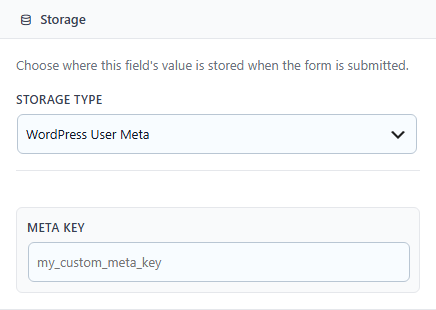
The Storage panel with the destination selector and the meta key field.
Meta keys
When storing to user meta, give the field a key. Pick something you will
recognise in six months and prefix it so it cannot collide with another plugin's
— acme_membership_number rather than number.
Changing a meta key after members have filled the form does not move the old values. The field will read as empty and the previous answers stay under the old key. Decide the key before you go live.
WordPress user fields
Mapping to a real WordPress user field means the value shows up everywhere WordPress already displays it — the users list, the profile screen, comment attribution. If you are collecting a first name, map it; do not invent a meta key for something WordPress already has a place for.
Transients
A transient expires. That makes it right for something you need to carry across a couple of steps and wrong for anything you expect to read back next month. If you find yourself wanting a longer expiry, you wanted user meta.
No storage
Two honest uses: a field that only displays something, and a field whose value your own code picks up from the submission via a hook. Anything else stored nowhere is a question you asked a member and then threw away.
Coming from version 1.x? The panel offered two more destinations, Custom Table and REST API. Neither stored anything: the screen took a table name or an endpoint, saved it in the schema, said Saved successfully, and wrote nothing anywhere. Both are removed in 2.0.
If you have fields still set to one of them, the selector shows the old value marked no longer available rather than silently switching them to something else — so you can see which fields need a decision. Until you make it, those fields are ignored on save rather than blocking the form. The values members typed into them were never stored, so there is nothing to recover.
Reading the values back
Values in user meta are ordinary WordPress user meta:
$number = get_user_meta( $user_id, 'acme_membership_number', true );Mapped WordPress fields are read the usual way, with get_userdata() or
get_user_by(). See the Developer API for the
hooks that fire around a save.
Something missing or out of date? Tell support.